This post is about how to work with switching in GNS3.
Configuration on how to create VLAN:
SW4#vlan database
SW4(vlan)#vlan 10 name Data_VLAN
VLAN 10 added:
Name: Data_VLAN
SW4(vlan)#vlan 20 name Voice_VLAN
VLAN 20 added:
Name: Voice_VLAN
SW4(vlan)#vlan 100 name MGMT_VLAN
VLAN 100 added:
Name: MGMT_VLAN
SW4(vlan)#apply
APPLY completed.
SW4(vlan)#exit
To join interfaces to VLAN
SW4(config)#int range fa 0/3 - 5
SW4(config-if-range)#switchport access vlan 10
SW4(config-if-range)#switchport voice vlan 20
SW4(config-if-range)#spanning-tree portfast
SW4(config-if-range)#exit
To show the VLAN status
SW4#show vlan-switch brief
VLAN Name Status Ports
---- -------------------------------- --------- -------------------------------
1 default active Fa0/6, Fa0/7, Fa0/8, Fa0/9
Fa0/10, Fa0/11, Fa0/12, Fa0/13
Fa0/14
10 Data_VLAN active Fa0/1, Fa0/2, Fa0/3, Fa0/4
Fa0/5
20 Voice_VLAN active
100 MGMT_VLAN active Fa0/15
1002 fddi-default active
1003 token-ring-default active
1004 fddinet-default active
1005 trnet-default active
SW4#
To save vlan configuration to vlan.dat and to make sure router retains vlan database after restarting GNS3
SW4#dir nvram:
Directory of nvram:/
123 -rw- 1536 <no date> startup-config
124 ---- 0 <no date> private-config
129016 bytes total (127428 bytes free)
SW4#config t
Enter configuration commands, one per line. End with CNTL/Z.
SW4(config)#vtp file nvram:vlan.dat
Setting device to store VLAN database at filename nvram:vlan.dat.
SW4(config)#do dir nvram:
Directory of nvram:/
123 -rw- 1536 <no date> startup-config
124 ---- 0 <no date> private-config
1 -rw- 780 <no date> vlan.dat
129016 bytes total (126404 bytes free)
SW4(config)#do wr mem
Building configuration...
[OK]
SW4(config)#
Monday, May 14, 2012

Sunday, April 22, 2012
Upgrading Cisco Switch 3750G with Overwrite Command
This post is to show step-by-step IOS upgrade for 3750G Switch.
Device and software used for this update:
- Cisco Switch 3750G-24T
- Cisco Switch IOS 12.2.55-SE5
- TFTP server software
Scenario:
- Cisco Switch 3540G flash has 5.7MB free space
- Cisco Switch IOS 12.2.55-ES5 upgrade needs 11.54MB
- Not enough free space on flash storage
First,find out the flash free space and what version of IOS is running on the switch.
Switch# dir flash:
Directory of flash:/
2 -rwx 3001 Jul 25 1993 05:53:33 +00:00 private-config.text
4 -rwx 1644 Jun 28 1993 14:11:01 +00:00 vlan.dat
459 drwx 192 Jun 16 1993 06:51:50 +00:00 c3750-ipbasek9-mz.122-35.SE2 458 -rwx 10170 Jul 25 1993 05:53:33 +00:00 config.text
15998976 bytes total (5790208 bytes free)
Switch#
As we can see here, the flash has 5.7MB of free space. The new IOS image requires 11.54MB as stated on Cisco Website.
Next step is to download the Image tar file from Cisco website.

Saved the file to TFTP server folder and ready to upload it to Cisco Switch.
Since there is not enough free space in Flash storage, we have to overwrite the old IOS file with the new one.
First send an icmp ping command to the TFTP server to make sure it is reachable from the Switch.
Switch#ping 10.1.1.173
Type escape sequence to abort.
Sending 5, 100-byte ICMP Echos to 10.1.1.173, timeout is 2 seconds:
!!!!!
Success rate is 100 percent (5/5), round-trip min/avg/max = 1/2/8 ms
Switch#
Next step is to upload and overwrite the current IOS with the new IOS (tar file).
Switch#archive download-sw /overwrite tftp://10.1.1.173/c3750-ipbaselmk9-tar.122-55.SE5.tar
Loading c3750-ipbaselmk9-tar.122-55.SE5.tar from 10.1.1.173 (via Vlan20): !!!!!!!!!!!!!!!!!!!!!!!!!!!!!!!!!!!!!!!!!!!!!!!!!!!!!!!!!!!!!!!!!!!!!!!!!!!!!!!!!!!!!!!!!!!!!!!!!!!!!!!!!!!!!!!!!!!!!!!!!!!!!!!!!!!!!!!!!!!!!!!!!!!!!!!!!!!!!!!!!!!!!!!!!!!!!!!!!!!!!!!!!!!!!!!!!!!!!!!!!!!!!!!!!!!!!!!!!!!!!!!!!!!!!!!!!!!!!!!!!!!!!!!!!!!!!!!!!!!!!!!!!!!!!!!!!!!!!!!!!!!!!!!!!!!!!!!!!!!!!!!!!!!!!!!!!!!!!!!!!!!!!!!!!!!!!!!!!!!!!!!!!!!!!!!!!!!!!!!!!!!!!!!!!!!!!!!!!!!!!!!!!!!!!!!!!!!!!!!!!!!!!!!!!!!!!!!!!!!!!!!!!!!!!!!!!!!!!!!!!!!!!!!!!!!!!!!!!!!!!!!!!!!!!!!!!!!!!!!!!!!!!!!!!!!!!!!!!!!!!!!!!!!!!!!!!!!!!!!!!!!!!!!!!!!!!!!!!!!!!!!!!!!!!!!!!!!!!!!!!!!!!!!!!!!!!!!!!!!!!!!!!!!!!!!!!!!!!!!!!!!!!!!!!!!!!!!!!!!!!!!!!!!!!!!!!!!!!!!!!!!!!!!!!!!!!!!!!!!!!!!!!!!!!!!!!!!!!!!!!!!!!!!!!!!!!!!!!!!!!!!!!!!!!!!!!!!!!!!!!!!!!!!!!!!!!!!!!!!!!!!!!!!!!!!!!!!!!!!!!!!!!!!!!!!!!!!!!!!!!!!!!!!!!!!!!!!!!!!!!!!!!!!!!!!!!!!!!!!!!!!!!!!!!!!!!!!!!!!!!!!!!!!!!!!!!!!!!!!!!!!!!!!!!!!!!!!!!!!!!!!!!!!!!!!!!!!!!!!!!!!!!!!!!!!!!!!!!!!!!!!!!!!!!!!!!!!!!!!!!!!!!!!!!!!!!!!!!!!!!!!!!!!!!!!!!!!!!!!!!!!!!!!!!!!!!!!!!!!!!!!!!!!!!!!!!!!!!!!!!!!!!!!!!!!!!!!!!!!!!!!!!!!!!!!!!!!!!!!!!!!!!!!!!!!!!!!!!!!!!!!!!!!!!!!!!!!!!!!!!!!!!!!!!!!!!!!!!!!!!!!!!!!!!!!!!!!!!!!!!!!!!!!!!!!!!!!!!!!!!!!!!!!!!!!!!!!!!!!!!!!!!!!!!!!!!!!!!!!!!!!!!!!!!!!!!
!!!!!!!!!!!!!!!!!!!!!!!!!!!!!!!!!!!!!!!!!!!!!!!!!!!!!!!!!!!!!!!!!!!!!!!!!!!!!!!!!!!!!!!!!!!!!!!!!!!!!!!!!!!!!!!!!!!!!!!!!!!!!!!!!!!!!!!!!!!!!!!!!!!!!!!!!!!!!!!!!!!!!!!!!!!!!!!!!!!!!!!!!!!!!!!!!!!!!!!!!!!!!!!!!!!!!!!!!!!!!!!!!!!!!!!!!!!!!!!!!!!!!!!!!!!!!!!!!!!!!!!!!!!!!!!!!!!!!!!!!!!!!!!!!!!!!!!!!!!!!!!!!!!!!!!!!!!!!!!!!!!!!!!!!!!!!!!!!!!!!!!!!!!!!!!!!!!!!!!!!!!!!!!!!!!!!!!!!!!!!!!!!!!!!!!!!!!!!!!!!!!!!!!!!!!!!!!!!!!!!!!!!!!!!!!!!!!!!!!!!!!!!!!!!!!!!!!!!!!!!!!!!!!!!!!!!!!!!!!!!!!!!!!!!!!!!!!!!!!!!!!!!!!!!!!!!!!!!!!!!!!!!!!!!!!!!!!!!!!!!!!!!!!!!!!!!!!!!!!!!!!!!!!!!!!!!!!!!!!!!!!!!!!!!!!!!!!!!!!!!!!!!!!!!!!!!!!!!!!!!!!!!!!!!!!!!!!!!!!!!!!!!!!!!!!!!!!!!!!!!!!!!!!!!!!!!!!!!!!!!!!!!!!!!!!!!!!!!!!!!!!!!!!!!!!!!!!!!!!!!!!!!!!!!!!!!!!!!!!!!!!!!!!!!!!!!!!!!!!!!!!!!!!!!!!!!!!!!!!!!!!!!!!!!!!!!!!!!!!!!!!!!!!!!!!!!!!!!!!!!!!!!!!!!!!!!!!!!!!!!!!!!!!!!!!!!!!!!!!!!!!!!!!!!!!!!!!!!!!!!!!!!!!!!!!!!!!!!!!!!!!!!!!!!!!!!!!!!!!!!!!!!!!!!!!!!!!!!!!!!!!!!!!!!!!!!!!!!!!!!!!!!!!!!!!!!!!!!!!!!!!!!!!!!!!!!!!!!!!!!!!!!!!!!!!!!!!!!!!!!!!!!!!!!!!!!!!!!!!!!!!!!!!!!!!!!!!!!!!!!!!!!!!!!!!!!!!!!!!!!!!!!!!!!!!!!!!!!!!!!!!!!!!!!!!!!!!!!!!!!!!!!!!!!!!!!!!!!!!!!!!!!!!!!!!!!!!!!!!!!!!!!!!!!!!!!!!!!!!!!!!!!!!!!!!!!!!!!!!!!!!!!!!!!!!!!!!!!!!!!!!!!!!!!!!!!!!!!!!!!!!!!!!!!!!!!!!!!!!!!!!!!!!!
[OK - 12697600 bytes]
Loading c3750-ipbaselmk9-tar.122-55.SE5.tar from 10.1.1.173 (via Vlan20): !!!!!!!!!!!!!!!!!!!!!!!!!!!!!!!!!!!!!!!!!!!!!!!!!!!!!!!!!!!!!!!!!!!!!!!!!!!!!!!!!!!!!!!!!!!!!!!!!!!!!!!!!!!!!!!!!!!!!!!!!!!!!!!!!!!!!!!!!!!!!!!!!!!!!!!!!!!!!!!!!!!!!!!!!!!!!!!!!!!!!!!!!!!!!!!!!!!!!!!!!!!!!!!!!!!!!!!!!!!!!!!!!!!!!!!!!!!!!!!!!!!!!!!!!!!!!!!!!!!!!!!!!!!!!!!!!!!!!!!!!!!!!!!!!!!!!!!!!!!!!!!!!!!!!!!!!!!!!!!!!!!!!!!!!!!!!!!!!!!!!!!!!!!!!!!!!!!!!!!!!!!!!!!!!!!!!!!!!!!!!!!!!!!!!!!!!!!!!!!!!!!!!!!!!!!!!!!!!!!!!!!!!!!!!!!!!!!!!!!!!!!!!!!!!!!!!!!!!!!!!!!!!!!!!!!!!!!!!!!!!!!!!!!!!!!!!!!!!!!!!!!!!!!!!!!!!!!!!!!!!!!!!!!!!!!!!!!!!!!!!!!!!!!!!!!!!!!!!!!!!!!!!!!!!!!!!!!!!!!!!!!!!!!!!!!!!!!!!!!!!!!!!!!!!!!!!!!!!!!!!!!!!!!!!!!!!!!!!!!!!!!!!!!!!!!!!!!!!!!!!!!!!!!!!!!!!!!!!!!!!!!!!!!!!!!!!!!!!!!!!!!!!!!!!!!!!!!!!!!!!!!!!!!!!!!!!!!!!!!!!!!!!!!!!!!!!!!!!!!!!!!!!!!!!!!!!!!!!!!!!!!!!!!!!!!!!!!!!!!!!!!!!!!!!!!!!!!!!!!!!!!!!!!!!!!!!!!!!!!!!!!!!!!!!!!!!!!!!!!!!!!!!!!!!!!!!!!!!!!!!!!!!!!!!!!!!!!!!!!!!!!!!!!!!!!!!!!!!!!!!!!!!!!!!!!!!!!!!!!!!!!!!!!!!!!!!!!!!!!!!!!!!!!!!!!!!!!!!!!!!!!!!!!!!!!!!!!!!!!!!!!!!!!!!!!!!!!!!!!!!!!!!!!!!!!!!!!!!!!!!!!!!!!!!!!!!!!!!!!!!!!!!!!!!!!!!!!!!!!!!!!!!!!!!!!!!!!!!!!!!!!!!!!!!!!!!!!!!!!!!!!!!!!!!!!!!!!!!!!!!!!!!!!!!!!!!!!!!!!!!!!!!!!!!!!!!!!!!!!!!!!!!!!!!!!!!!!!!!!!!!!!!!!!!!!!!!!!!!!!!!!!!!!!!!!!!!!!!!!!!!!!!!!!!!!!!!!!!!!!!!!!!!!!!!!!!!!!!!!!!!!!!!!!!!!!!!!!!!!!!!!!!!!!!!!!!!!!!!!!!!!!!!!!!!!!!!!!!!!!!!!!!!!!!!!!!!!!!!!!!!!!!!!!!!!!!!!!!!!!!!!!!!!!!!!!!!!!!!!!!!!!!!!!!!!!!!!!!!!!!!!!!!!!!!!!!!!!!!!!!!!!!!!!!!!!!!!!!!!!!!!!!!!!!!!!!!!!!!!!!!!!!!!!!!!!!!!!!!!!!!!!!!!!!!!!!!!!!!!!!!!!!!!!!!!!!!!!!!!!!!!!!!!!!!!!!!!!!!!!!!!!!!!!!!!!!!!!!!!!!!!!!!!!!!!!!!!!!!!!!!!!!!!!!!!!!!!!!!!!!!!!!!!!!!!!!!!!!!!!!!!!!!!!!!!!!!!!!!!!!!!!!!!!!!!!!!!!!!!!!!!!!!!!!!!!!!!!!!!!!!!!!!!!!!!!!!!!!!!!!!!!!!!!!!!!!!!!!!!!!!!!!!!!!!!!!!!!!!!!!!!!!!!!!!!!!!!!!!!!!!!!!!!!!!!!!!!!!!!!!!!!!!!!!!!!!!!!!!!!!!!!!!!!!!!!!!!!!!!!!!!!!!!!!!!!!!!!!!!!!!!!!!!!!!!!!!!!!!!!!!!!!!!!!!!!!!!!!!!!!!!!!!!!!!!!!!!!!!!!!!!!!!!!!!!!!!!!!!!!!!!!!!!!!!!!!!!!!!!!!!!!!!!!!!!!!!!!!!!!!!!!!!!!!!!!!!!!!!!!!!!!!!!!!!!!!!!!!!!!!!!!!!!!!!!!!!!!!!!!!!!!!!!!!!!!!!!!!!!!!!!!!!!!!!!!!!!!!!!!!!!!!!!!!!!!!!!!!!!!!!!!!!!!!!!!!!!!!!!!!!!!!!!!!!!!!!!!!!!!!!!!!!!!!!!!!!!!!!!!!!!!!!!!!!!!!!!!!!!!!!!!!!!!!!!!!!!!!!!!!!!!!!!!!!!!!!!!!!!!!!!!!!!!!!!!!!!!!!!!!!!!!!!!!!!!!!!!!!!!!!!!!!!!!!!!!!!!!!!!!!!!!!!!!!!!!!!!!!!!!!!!!!!!!!!!!!!!!!!!!!!!!!!!!!!!!!!!!!!!!!!!!!!!!!!!!!!!!!!!!!!!!!!!!!!!!!!!!!!!!!!!!!!!!!!!!!!!!!!!!!!!!!!!!!!!!!!!!!!!!!!!!!!!!!!!!!!!!!!!!!!!!!!!!!!!!!!!!!!!!!!!!!!!!!!!!!!!!!!!
examining image...
extracting info (106 bytes)
extracting c3750-ipbasek9-mz.122-55.SE5/info (681 bytes)
extracting info (106 bytes)
Stacking Version Number: 1.45
System Type: 0x00000000
Ios Image File Size: 0x00B8B200
Total Image File Size: 0x00C19A00 Minimum Dram required: 0x08000000
Image Suffix: ipbasek9-122-55.SE5
Image Directory: c3750-ipbasek9-mz.122-55.SE5
Image Name: c3750-ipbasek9-mz.122-55.SE5.bin
Image Feature: IP|LAYER_3|SSH|3DES|MIN_DRAM_MEG=128
Old image for switch 1: flash:c3750-ipbasek9-mz.122-35.SE2
Old image will be deleted before download.
Deleting `flash:c3750-ipbasek9-mz.122-35.SE2' to create required space
Extracting images from archive into flash...
Once the overwrite is done, confirm that the Cisco Switch is booting from the new image.
Switch#dir flash:
Directory of flash:/
2 -rwx 3001 Jul 25 1993 05:53:33 +00:00 private-config.text
4 -rwx 1644 Jun 28 1993 14:11:01 +00:00 vlan.dat
510 drwx 192 Aug 8 1993 09:32:45 +00:00 c3750-ipbasek9-mz.122-55.SE5
458 -rwx 10170 Jul 25 1993 05:53:33 +00:00 config.text
15998976 bytes total (3331072 bytes free)
Switch#
The next step is to boot the image, save the configuration and reboot the system.
Switch#show boot
BOOT path-list : flash:c3750-ipbasek9-mz.122-55.SE5/c3750-ipbasek9-mz.122-55.SE5.bin
Config file : flash:/config.text
Private Config file : flash:/private-config.text
Enable Break : no
Manual Boot : no
HELPER path-list :
Auto upgrade : yes
Auto upgrade path :
Switch#
Switch#wr
Building configuration...
[OK]
Switch#reload
Proceed with reload? [confirm]
Device and software used for this update:
- Cisco Switch 3750G-24T
- Cisco Switch IOS 12.2.55-SE5
- TFTP server software
Scenario:
- Cisco Switch 3540G flash has 5.7MB free space
- Cisco Switch IOS 12.2.55-ES5 upgrade needs 11.54MB
- Not enough free space on flash storage
First,find out the flash free space and what version of IOS is running on the switch.
Switch# dir flash:
Directory of flash:/
2 -rwx 3001 Jul 25 1993 05:53:33 +00:00 private-config.text
4 -rwx 1644 Jun 28 1993 14:11:01 +00:00 vlan.dat
459 drwx 192 Jun 16 1993 06:51:50 +00:00 c3750-ipbasek9-mz.122-35.SE2 458 -rwx 10170 Jul 25 1993 05:53:33 +00:00 config.text
15998976 bytes total (5790208 bytes free)
Switch#
As we can see here, the flash has 5.7MB of free space. The new IOS image requires 11.54MB as stated on Cisco Website.

Saved the file to TFTP server folder and ready to upload it to Cisco Switch.
Since there is not enough free space in Flash storage, we have to overwrite the old IOS file with the new one.
First send an icmp ping command to the TFTP server to make sure it is reachable from the Switch.
Switch#ping 10.1.1.173
Type escape sequence to abort.
Sending 5, 100-byte ICMP Echos to 10.1.1.173, timeout is 2 seconds:
!!!!!
Success rate is 100 percent (5/5), round-trip min/avg/max = 1/2/8 ms
Switch#
Next step is to upload and overwrite the current IOS with the new IOS (tar file).
Switch#archive download-sw /overwrite tftp://10.1.1.173/c3750-ipbaselmk9-tar.122-55.SE5.tar
Loading c3750-ipbaselmk9-tar.122-55.SE5.tar from 10.1.1.173 (via Vlan20): !!!!!!!!!!!!!!!!!!!!!!!!!!!!!!!!!!!!!!!!!!!!!!!!!!!!!!!!!!!!!!!!!!!!!!!!!!!!!!!!!!!!!!!!!!!!!!!!!!!!!!!!!!!!!!!!!!!!!!!!!!!!!!!!!!!!!!!!!!!!!!!!!!!!!!!!!!!!!!!!!!!!!!!!!!!!!!!!!!!!!!!!!!!!!!!!!!!!!!!!!!!!!!!!!!!!!!!!!!!!!!!!!!!!!!!!!!!!!!!!!!!!!!!!!!!!!!!!!!!!!!!!!!!!!!!!!!!!!!!!!!!!!!!!!!!!!!!!!!!!!!!!!!!!!!!!!!!!!!!!!!!!!!!!!!!!!!!!!!!!!!!!!!!!!!!!!!!!!!!!!!!!!!!!!!!!!!!!!!!!!!!!!!!!!!!!!!!!!!!!!!!!!!!!!!!!!!!!!!!!!!!!!!!!!!!!!!!!!!!!!!!!!!!!!!!!!!!!!!!!!!!!!!!!!!!!!!!!!!!!!!!!!!!!!!!!!!!!!!!!!!!!!!!!!!!!!!!!!!!!!!!!!!!!!!!!!!!!!!!!!!!!!!!!!!!!!!!!!!!!!!!!!!!!!!!!!!!!!!!!!!!!!!!!!!!!!!!!!!!!!!!!!!!!!!!!!!!!!!!!!!!!!!!!!!!!!!!!!!!!!!!!!!!!!!!!!!!!!!!!!!!!!!!!!!!!!!!!!!!!!!!!!!!!!!!!!!!!!!!!!!!!!!!!!!!!!!!!!!!!!!!!!!!!!!!!!!!!!!!!!!!!!!!!!!!!!!!!!!!!!!!!!!!!!!!!!!!!!!!!!!!!!!!!!!!!!!!!!!!!!!!!!!!!!!!!!!!!!!!!!!!!!!!!!!!!!!!!!!!!!!!!!!!!!!!!!!!!!!!!!!!!!!!!!!!!!!!!!!!!!!!!!!!!!!!!!!!!!!!!!!!!!!!!!!!!!!!!!!!!!!!!!!!!!!!!!!!!!!!!!!!!!!!!!!!!!!!!!!!!!!!!!!!!!!!!!!!!!!!!!!!!!!!!!!!!!!!!!!!!!!!!!!!!!!!!!!!!!!!!!!!!!!!!!!!!!!!!!!!!!!!!!!!!!!!!!!!!!!!!!!!!!!!!!!!!!!!!!!!!!!!!!!!!!!!!!!!!!!!!!!!!!!!!!!!!!!!!!!!!!!!!!!!!!!!!!!!!!!!!!!!!!!!!!!!!!!!!!!!!!!!!!!!!!!!!!!!!!!!!!!!!!!!!!!!!!!!!!!!!!!!!!!!!!!!!!
!!!!!!!!!!!!!!!!!!!!!!!!!!!!!!!!!!!!!!!!!!!!!!!!!!!!!!!!!!!!!!!!!!!!!!!!!!!!!!!!!!!!!!!!!!!!!!!!!!!!!!!!!!!!!!!!!!!!!!!!!!!!!!!!!!!!!!!!!!!!!!!!!!!!!!!!!!!!!!!!!!!!!!!!!!!!!!!!!!!!!!!!!!!!!!!!!!!!!!!!!!!!!!!!!!!!!!!!!!!!!!!!!!!!!!!!!!!!!!!!!!!!!!!!!!!!!!!!!!!!!!!!!!!!!!!!!!!!!!!!!!!!!!!!!!!!!!!!!!!!!!!!!!!!!!!!!!!!!!!!!!!!!!!!!!!!!!!!!!!!!!!!!!!!!!!!!!!!!!!!!!!!!!!!!!!!!!!!!!!!!!!!!!!!!!!!!!!!!!!!!!!!!!!!!!!!!!!!!!!!!!!!!!!!!!!!!!!!!!!!!!!!!!!!!!!!!!!!!!!!!!!!!!!!!!!!!!!!!!!!!!!!!!!!!!!!!!!!!!!!!!!!!!!!!!!!!!!!!!!!!!!!!!!!!!!!!!!!!!!!!!!!!!!!!!!!!!!!!!!!!!!!!!!!!!!!!!!!!!!!!!!!!!!!!!!!!!!!!!!!!!!!!!!!!!!!!!!!!!!!!!!!!!!!!!!!!!!!!!!!!!!!!!!!!!!!!!!!!!!!!!!!!!!!!!!!!!!!!!!!!!!!!!!!!!!!!!!!!!!!!!!!!!!!!!!!!!!!!!!!!!!!!!!!!!!!!!!!!!!!!!!!!!!!!!!!!!!!!!!!!!!!!!!!!!!!!!!!!!!!!!!!!!!!!!!!!!!!!!!!!!!!!!!!!!!!!!!!!!!!!!!!!!!!!!!!!!!!!!!!!!!!!!!!!!!!!!!!!!!!!!!!!!!!!!!!!!!!!!!!!!!!!!!!!!!!!!!!!!!!!!!!!!!!!!!!!!!!!!!!!!!!!!!!!!!!!!!!!!!!!!!!!!!!!!!!!!!!!!!!!!!!!!!!!!!!!!!!!!!!!!!!!!!!!!!!!!!!!!!!!!!!!!!!!!!!!!!!!!!!!!!!!!!!!!!!!!!!!!!!!!!!!!!!!!!!!!!!!!!!!!!!!!!!!!!!!!!!!!!!!!!!!!!!!!!!!!!!!!!!!!!!!!!!!!!!!!!!!!!!!!!!!!!!!!!!!!!!!!!!!!!!!!!!!!!!!!!!!!!!!!!!!!!!!!!!!!!!!!!!!!!!!!!!!!!!!!!!!!!!!!!!!!!!!!!!!!!!!!!!!!!!!!!!!!!!!!!!!!!!!!!!!!!!!!!!!!!!!!!!!!!!!!!!
[OK - 12697600 bytes]
Loading c3750-ipbaselmk9-tar.122-55.SE5.tar from 10.1.1.173 (via Vlan20): !!!!!!!!!!!!!!!!!!!!!!!!!!!!!!!!!!!!!!!!!!!!!!!!!!!!!!!!!!!!!!!!!!!!!!!!!!!!!!!!!!!!!!!!!!!!!!!!!!!!!!!!!!!!!!!!!!!!!!!!!!!!!!!!!!!!!!!!!!!!!!!!!!!!!!!!!!!!!!!!!!!!!!!!!!!!!!!!!!!!!!!!!!!!!!!!!!!!!!!!!!!!!!!!!!!!!!!!!!!!!!!!!!!!!!!!!!!!!!!!!!!!!!!!!!!!!!!!!!!!!!!!!!!!!!!!!!!!!!!!!!!!!!!!!!!!!!!!!!!!!!!!!!!!!!!!!!!!!!!!!!!!!!!!!!!!!!!!!!!!!!!!!!!!!!!!!!!!!!!!!!!!!!!!!!!!!!!!!!!!!!!!!!!!!!!!!!!!!!!!!!!!!!!!!!!!!!!!!!!!!!!!!!!!!!!!!!!!!!!!!!!!!!!!!!!!!!!!!!!!!!!!!!!!!!!!!!!!!!!!!!!!!!!!!!!!!!!!!!!!!!!!!!!!!!!!!!!!!!!!!!!!!!!!!!!!!!!!!!!!!!!!!!!!!!!!!!!!!!!!!!!!!!!!!!!!!!!!!!!!!!!!!!!!!!!!!!!!!!!!!!!!!!!!!!!!!!!!!!!!!!!!!!!!!!!!!!!!!!!!!!!!!!!!!!!!!!!!!!!!!!!!!!!!!!!!!!!!!!!!!!!!!!!!!!!!!!!!!!!!!!!!!!!!!!!!!!!!!!!!!!!!!!!!!!!!!!!!!!!!!!!!!!!!!!!!!!!!!!!!!!!!!!!!!!!!!!!!!!!!!!!!!!!!!!!!!!!!!!!!!!!!!!!!!!!!!!!!!!!!!!!!!!!!!!!!!!!!!!!!!!!!!!!!!!!!!!!!!!!!!!!!!!!!!!!!!!!!!!!!!!!!!!!!!!!!!!!!!!!!!!!!!!!!!!!!!!!!!!!!!!!!!!!!!!!!!!!!!!!!!!!!!!!!!!!!!!!!!!!!!!!!!!!!!!!!!!!!!!!!!!!!!!!!!!!!!!!!!!!!!!!!!!!!!!!!!!!!!!!!!!!!!!!!!!!!!!!!!!!!!!!!!!!!!!!!!!!!!!!!!!!!!!!!!!!!!!!!!!!!!!!!!!!!!!!!!!!!!!!!!!!!!!!!!!!!!!!!!!!!!!!!!!!!!!!!!!!!!!!!!!!!!!!!!!!!!!!!!!!!!!!!!!!!!!!!!!!!!!!!!!!!!!!!!!!!!!!!!!!!!!!!!!!!!!!!!!!!!!!!!!!!!!!!!!!!!!!!!!!!!!!!!!!!!!!!!!!!!!!!!!!!!!!!!!!!!!!!!!!!!!!!!!!!!!!!!!!!!!!!!!!!!!!!!!!!!!!!!!!!!!!!!!!!!!!!!!!!!!!!!!!!!!!!!!!!!!!!!!!!!!!!!!!!!!!!!!!!!!!!!!!!!!!!!!!!!!!!!!!!!!!!!!!!!!!!!!!!!!!!!!!!!!!!!!!!!!!!!!!!!!!!!!!!!!!!!!!!!!!!!!!!!!!!!!!!!!!!!!!!!!!!!!!!!!!!!!!!!!!!!!!!!!!!!!!!!!!!!!!!!!!!!!!!!!!!!!!!!!!!!!!!!!!!!!!!!!!!!!!!!!!!!!!!!!!!!!!!!!!!!!!!!!!!!!!!!!!!!!!!!!!!!!!!!!!!!!!!!!!!!!!!!!!!!!!!!!!!!!!!!!!!!!!!!!!!!!!!!!!!!!!!!!!!!!!!!!!!!!!!!!!!!!!!!!!!!!!!!!!!!!!!!!!!!!!!!!!!!!!!!!!!!!!!!!!!!!!!!!!!!!!!!!!!!!!!!!!!!!!!!!!!!!!!!!!!!!!!!!!!!!!!!!!!!!!!!!!!!!!!!!!!!!!!!!!!!!!!!!!!!!!!!!!!!!!!!!!!!!!!!!!!!!!!!!!!!!!!!!!!!!!!!!!!!!!!!!!!!!!!!!!!!!!!!!!!!!!!!!!!!!!!!!!!!!!!!!!!!!!!!!!!!!!!!!!!!!!!!!!!!!!!!!!!!!!!!!!!!!!!!!!!!!!!!!!!!!!!!!!!!!!!!!!!!!!!!!!!!!!!!!!!!!!!!!!!!!!!!!!!!!!!!!!!!!!!!!!!!!!!!!!!!!!!!!!!!!!!!!!!!!!!!!!!!!!!!!!!!!!!!!!!!!!!!!!!!!!!!!!!!!!!!!!!!!!!!!!!!!!!!!!!!!!!!!!!!!!!!!!!!!!!!!!!!!!!!!!!!!!!!!!!!!!!!!!!!!!!!!!!!!!!!!!!!!!!!!!!!!!!!!!!!!!!!!!!!!!!!!!!!!!!!!!!!!!!!!!!!!!!!!!!!!!!!!!!!!!!!!!!!!!!!!!!!!!!!!!!!!!!!!!!!!!!!!!!!!!!!!!!!!!!!!!!!!!!!!!!!!!!!!!!!!!!!!!!!!!!!!!!!!!!!!!!!!!!!!!!!!!!!!!!!!!!!!!!!!!!!!!!!!!!!!!!!!!!!!!!!!!!!!!!!!!!!!!!!!!!!!!!!!!!!!!!!!!!!!!!!!!!!!!!!!!!!!!!!!!!!!!!!!!!!!!!!!!!!!!!!!!!
examining image...
extracting info (106 bytes)
extracting c3750-ipbasek9-mz.122-55.SE5/info (681 bytes)
extracting info (106 bytes)
Stacking Version Number: 1.45
System Type: 0x00000000
Ios Image File Size: 0x00B8B200
Total Image File Size: 0x00C19A00 Minimum Dram required: 0x08000000
Image Suffix: ipbasek9-122-55.SE5
Image Directory: c3750-ipbasek9-mz.122-55.SE5
Image Name: c3750-ipbasek9-mz.122-55.SE5.bin
Image Feature: IP|LAYER_3|SSH|3DES|MIN_DRAM_MEG=128
Old image for switch 1: flash:c3750-ipbasek9-mz.122-35.SE2
Old image will be deleted before download.
Deleting `flash:c3750-ipbasek9-mz.122-35.SE2' to create required space
Extracting images from archive into flash...
Once the overwrite is done, confirm that the Cisco Switch is booting from the new image.
Switch#dir flash:
Directory of flash:/
2 -rwx 3001 Jul 25 1993 05:53:33 +00:00 private-config.text
4 -rwx 1644 Jun 28 1993 14:11:01 +00:00 vlan.dat
510 drwx 192 Aug 8 1993 09:32:45 +00:00 c3750-ipbasek9-mz.122-55.SE5
458 -rwx 10170 Jul 25 1993 05:53:33 +00:00 config.text
15998976 bytes total (3331072 bytes free)
Switch#
The next step is to boot the image, save the configuration and reboot the system.
Switch#show boot
BOOT path-list : flash:c3750-ipbasek9-mz.122-55.SE5/c3750-ipbasek9-mz.122-55.SE5.bin
Config file : flash:/config.text
Private Config file : flash:/private-config.text
Enable Break : no
Manual Boot : no
HELPER path-list :
Auto upgrade : yes
Auto upgrade path :
Switch#
Switch#wr
Building configuration...
[OK]
Switch#reload
Proceed with reload? [confirm]
Thursday, April 12, 2012
ASA 5505 Licensed Host Limit Reached
ASA 5505 basic license comes with only 10 internal host connection. If you have more than 10 devices that need access to the internet, the 11th device will not get a NATed.
For short term solution, you can reload the ASA configuration.
But to permanently fix this issue, you have to get a different license key from Cisco. For example upgrade from basic 10 users to 50 users license.
To check the status of the license limit, use this command:
show local-host
For short term solution, you can reload the ASA configuration.
But to permanently fix this issue, you have to get a different license key from Cisco. For example upgrade from basic 10 users to 50 users license.
To check the status of the license limit, use this command:
show local-host
Monday, March 19, 2012
Windows 7 Certificate Manager
MS Windows 7 Certificate Manager.
To view certificate manager on Windows 7, please run certmgr.msc on start menu.

This will open a Certificate Manager window like the following:

To view certificate manager on Windows 7, please run certmgr.msc on start menu.
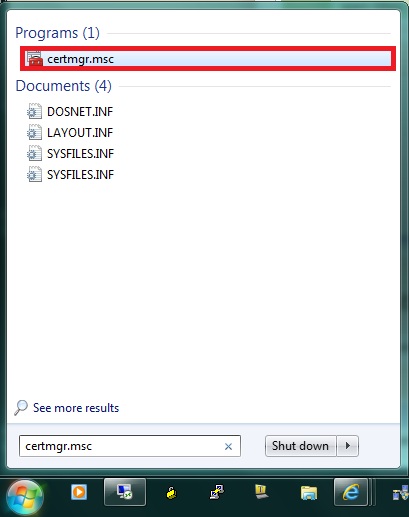
This will open a Certificate Manager window like the following:

Tuesday, March 13, 2012
ASA 5510 ASDM enable feature to view traffic
This is the steps to enable Top 10 Sources / Top 10 Destinations on ASA 5505 using GUI interface.


Configuration > Firewall > Threat Detection > Scanning Threat Statistics
Host = Top 10 Sources / Destination
Access Rules = Top 10 Access Rules
Port / Protocol = Top 10 Services
Saturday, February 4, 2012
BPDU Guard on Switch STP
SW1 has 48 ports with 4 10 Gig ports on Port tengig 49,50,51,52
switch> enable
switch# configure terminal
switch(config)# hostname SW1
SW1(config)# interface tengig 0/49
SW1(config-if)# switchport mode trunk
SW1(config-if)# switchport encapsulation dot1q
SW1(config-if)# switcport trunk native vlan 99
SW1(config-if)# description Trunk port to SW2
SW1(config-if)# no shutdown
SW1(config-if)# exit
SW1(config)#
SW1(config)#
SW1(config)# int range gigten 0/50-52
SW1(config-if)# shutdown
SW1(config-if)# exit
SW1(config)#
SW1(config)# spanning-tree portfast default
SW1(config)# int range gig 0/1-48
SW1(config-if)# spanning-tree portfast bpduguard default
SW1(config-if)# exit
SW1(config)#
SW1(config)#
switch> enable
switch# configure terminal
switch(config)# hostname SW1
SW1(config)# interface tengig 0/49
SW1(config-if)# switchport mode trunk
SW1(config-if)# switchport encapsulation dot1q
SW1(config-if)# switcport trunk native vlan 99
SW1(config-if)# description Trunk port to SW2
SW1(config-if)# no shutdown
SW1(config-if)# exit
SW1(config)#
SW1(config)#
SW1(config)# int range gigten 0/50-52
SW1(config-if)# shutdown
SW1(config-if)# exit
SW1(config)#
SW1(config)# spanning-tree portfast default
SW1(config)# int range gig 0/1-48
SW1(config-if)# spanning-tree portfast bpduguard default
SW1(config-if)# exit
SW1(config)#
SW1(config)#
Wednesday, January 4, 2012
VLAN Access List Configuration
VLAN Access List Configuration:
We can use VLan Access List to filter traffic that is flowing within a VLAN.
switch(config)# vlan access-map map-name [sequence-number]
Follows with a matching condition with one of the following access map configuration commands:
switch(config-access-map)# match ip address {acl-number | acl-name}
switch(config-access-map)# match ipx address {acl-number | acl-name}
switch(config-access-map)# match mac address acl-name
Define the action with the following access map configuration command:
switch(config-access-map)# action {drop | forward [capture] | redirect type mod/num}
We can use VLan Access List to filter traffic that is flowing within a VLAN.
switch(config)# vlan access-map map-name [sequence-number]
Follows with a matching condition with one of the following access map configuration commands:
switch(config-access-map)# match ip address {acl-number | acl-name}
switch(config-access-map)# match ipx address {acl-number | acl-name}
switch(config-access-map)# match mac address acl-name
Define the action with the following access map configuration command:
switch(config-access-map)# action {drop | forward [capture] | redirect type mod/num}
Subscribe to:
Posts (Atom)